VIM: tips and tricks
Contents
VIM: tips and tricks#
List of commands for setting up VIM#
NOTE : you can run this commands inside VIM with a “:” in the beginning OR store these commands in (.vimrc) in your home folder.
Source:
show line number
set number
enable syntax highlighting
syntax on
enable auto indentation
set autoindent
for fortran f90 files
let b:fortran_fixed_source=0
replacing tab with white space: When you insert tabs into your codes and save it and send it to someone else, he/she must use the same tab size as you did. Otherwise, the code would look very ugly.
set expandtab
set cursor lines and columns
set cursorline
set cursorcolumn
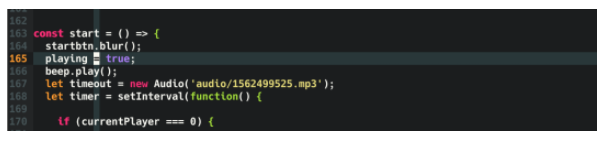
This is how it looks like: